This document serves as a complete guide for integrating the SumSub KYC flow seamlessly into Guardarian’s customer creation process. In this document, we will cover the technical aspects of KYC sharing using internal SumSub tokens, how Guardarian can accept these tokens, and how passing a sharing token will affect the target user’s experience. With this integration, you can streamline your customer onboarding process, reduce manual effort and ensure compliance with regulatory requirements. By following the instructions in this document, you can quickly and easily integrate your SumSub KYC flow into Guardarian’s platform and start offering a seamless onboarding experience to your customers.
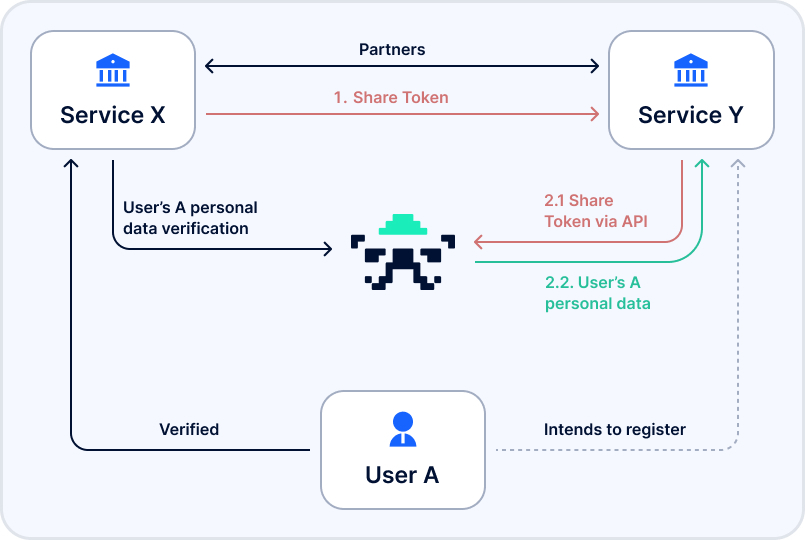
shareToken implementationOne of the key challenges that SumSub’s shareToken aims to solve is the cumbersome requirement for users to pass another KYC verification process when switching between platforms, even when those platforms are tightly integrated. SumSub’s solution is designed to simplify this process, by enabling the secure sharing of KYC data between platforms using a unique sharing token. With shareToken, customers only need to complete the KYC process once, and can then seamlessly switch between integrated platforms without having to go through the KYC process again. The solution proposed by SumSub is as follows:
SumSub integration schema
SumSub’s internal API offers an endpoint to generate a shareToken for your customer, passing its internal SumSub applicantId and the service clientId as query parameters:
## applicantId and Y's client ID must be provided
curl -X POST '<https://api.sumsub.com/resources/accessTokens/-/shareToken?applicantId=5ce412012b4da877b2d910bd&forClientId=CoolCoinLtd>'
Response:
{
  "token": "_act-460a698b-d2bc-4cbc-9456-5f36fee38083",
  "forClientId": "CoolCoinLtd"
}
You can read more information about this flow in the SumSub API Reference.
Currently, Guardarian accepts passing the shareToken as a parameter when creating the transaction. Several fields are required to be set in the request for this flow to trigger:
| field name | type | acceptable values |
|---|---|---|
kyc_shared_token |
string |
any shareToken generated by SumSub |
kyc_shared_token_provider |
string enum |
sumsub |
Example:
// POST /v1/transaction
{
  // Example transaction data:
  "from_amount": 1200.24,
  "from_currency": "EUR",
  "to_currency": "BTC",
  "from_network": "EUR",
  "to_network": "BTC",
  // KYC share token data:
  "kyc_shared_token": "_act-460a698b-d2bc-4cbc-9456-5f36fee38083",
  "kyc_shared_token_provider": "sumsub"
}